Friday, January 4, 2013
Today I am going to post how you can display all the system properties with a simple Java program. You will need the java.util.Enumeration and java.util.Properties class. There is a method getProperties() defined in java.lang.System class. This method returns all the properties associated with your system as a Properties reference. Now we get an Enumeration of all keys of the properties. Next we iterate through each element of enumeration and get the value of individual keys and display them.
--------------------------------------------------------------------------------------------------------------------------
import java.util.Enumeration;
import java.util.Properties;
public class SystemProperties{
public static void main (String[] args) {
Properties p=System.getProperties(); //getting system properties
Enumeration keys = p.keys(); //getting all keys of properties
while (keys.hasMoreElements()) {
String key = (String)keys.nextElement(); //getting next key
String value = (String)p.get(key); //getting key value
System.out.println(key + ": " + value);
}
}
}
--------------------------------------------------------------------------------------------------------------------------
java.runtime.name: Java(TM) SE Runtime Environment
sun.boot.library.path: C:\Program Files\Java\jdk1.7.0\jre\bin
java.vm.version: 21.0-b17
java.vm.vendor: Oracle Corporation
java.vendor.url: http://java.oracle.com/
path.separator: ;
java.vm.name: Java HotSpot(TM) Client VM
file.encoding.pkg: sun.io
user.country: US
user.script:
sun.java.launcher: SUN_STANDARD
sun.os.patch.level:
java.vm.specification.name: Java Virtual Machine Specification
user.dir: D:\Choto documents\Choto documents\Java Programs
java.runtime.version: 1.7.0-b147
java.awt.graphicsenv: sun.awt.Win32GraphicsEnvironment
java.endorsed.dirs: C:\Program Files\Java\jdk1.7.0\jre\lib\endorsed
os.arch: x86
java.io.tmpdir: C:\Users\Chelsea\AppData\Local\Temp\
line.separator:
java.vm.specification.vendor: Oracle Corporation
user.variant:
os.name: Windows 7
sun.jnu.encoding: Cp1252
java.library.path: C:\Program Files\Java\jdk1.7.0\bin;C:\Windows\Sun\Java\bin;C:\Windows\system32;C:\Windows;C:\Program Files\PC Connectivity Solution\;C:\Program Files\Java\jdk1.7.0\bin;C:\Windows\system32;C:\Windows;C:\Windows\System32\Wbem;C:\Windows\System32\WindowsPowerShell\v1.0\;.
java.specification.name: Java Platform API Specification
java.class.version: 51.0
sun.management.compiler: HotSpot Client Compiler
os.version: 6.1
user.home: C:\Users\Chelsea
user.timezone:
java.awt.printerjob: sun.awt.windows.WPrinterJob
file.encoding: Cp1252
java.specification.version: 1.7
java.class.path: D:\Java Programs;C:\Program Files\Java\jdk1.7.0\jre\lib\rt.jar;C:\Program Files\Java\jdk1.7.0\lib\dt.jar;C:\Program Files\Java\jdk1.7.0\lib\tools.jar;C:\Program Files\Java\jdk1.7.0\jre\lib\ext\dnsns.jar;C:\Program Files\Java\jdk1.7.0\jre\lib\ext\localedata.jar;C:\Program Files\Java\jdk1.7.0\jre\lib\ext\sunec.jar;C:\Program Files\Java\jdk1.7.0\jre\lib\ext\sunjce_provider.jar;C:\Program Files\Java\jdk1.7.0\jre\lib\ext\sunmscapi.jar;C:\Program Files\Java\jdk1.7.0\jre\lib\ext\sunpkcs11.jar;C:\Program Files\Java\jdk1.7.0\jre\lib\ext\zipfs.jar
user.name: -MadMickael/FFF
java.vm.specification.version: 1.7
sun.java.command: SystemProperties
java.home: C:\Program Files\Java\jdk1.7.0\jre
sun.arch.data.model: 32
user.language: en
java.specification.vendor: Oracle Corporation
awt.toolkit: sun.awt.windows.WToolkit
java.vm.info: mixed mode, sharing
java.version: 1.7.0
java.ext.dirs: C:\Program Files\Java\jdk1.7.0\jre\lib\ext;C:\Windows\Sun\Java\lib\ext
sun.boot.class.path: C:\Program Files\Java\jdk1.7.0\jre\lib\resources.jar;C:\Program Files\Java\jdk1.7.0\jre\lib\rt.jar;C:\Program Files\Java\jdk1.7.0\jre\lib\sunrsasign.jar;C:\Program Files\Java\jdk1.7.0\jre\lib\jsse.jar;C:\Program Files\Java\jdk1.7.0\jre\lib\jce.jar;C:\Program Files\Java\jdk1.7.0\jre\lib\charsets.jar;C:\Program Files\Java\jdk1.7.0\jre\classes
java.vendor: Oracle Corporation
file.separator: \
java.vendor.url.bug: http://bugreport.sun.com/bugreport/
sun.io.unicode.encoding: UnicodeLittle
sun.cpu.endian: little
sun.desktop: windows
sun.cpu.isalist: pentium_pro+mmx pentium_pro pentium+mmx pentium i486 i386 i86
--------------------------------------------------------------------------------------------------------------------------
DOWNLOAD the source from Mediafire
DOWNLOAD the source from 4shared
--------------------------------------------------------------------------------------------------------------------------
Java Source Code
--------------------------------------------------------------------------------------------------------------------------import java.util.Enumeration;
import java.util.Properties;
public class SystemProperties{
public static void main (String[] args) {
Properties p=System.getProperties(); //getting system properties
Enumeration keys = p.keys(); //getting all keys of properties
while (keys.hasMoreElements()) {
String key = (String)keys.nextElement(); //getting next key
String value = (String)p.get(key); //getting key value
System.out.println(key + ": " + value);
}
}
}
--------------------------------------------------------------------------------------------------------------------------
Output
--------------------------------------------------------------------------------------------------------------------------java.runtime.name: Java(TM) SE Runtime Environment
sun.boot.library.path: C:\Program Files\Java\jdk1.7.0\jre\bin
java.vm.version: 21.0-b17
java.vm.vendor: Oracle Corporation
java.vendor.url: http://java.oracle.com/
path.separator: ;
java.vm.name: Java HotSpot(TM) Client VM
file.encoding.pkg: sun.io
user.country: US
user.script:
sun.java.launcher: SUN_STANDARD
sun.os.patch.level:
java.vm.specification.name: Java Virtual Machine Specification
user.dir: D:\Choto documents\Choto documents\Java Programs
java.runtime.version: 1.7.0-b147
java.awt.graphicsenv: sun.awt.Win32GraphicsEnvironment
java.endorsed.dirs: C:\Program Files\Java\jdk1.7.0\jre\lib\endorsed
os.arch: x86
java.io.tmpdir: C:\Users\Chelsea\AppData\Local\Temp\
line.separator:
java.vm.specification.vendor: Oracle Corporation
user.variant:
os.name: Windows 7
sun.jnu.encoding: Cp1252
java.library.path: C:\Program Files\Java\jdk1.7.0\bin;C:\Windows\Sun\Java\bin;C:\Windows\system32;C:\Windows;C:\Program Files\PC Connectivity Solution\;C:\Program Files\Java\jdk1.7.0\bin;C:\Windows\system32;C:\Windows;C:\Windows\System32\Wbem;C:\Windows\System32\WindowsPowerShell\v1.0\;.
java.specification.name: Java Platform API Specification
java.class.version: 51.0
sun.management.compiler: HotSpot Client Compiler
os.version: 6.1
user.home: C:\Users\Chelsea
user.timezone:
java.awt.printerjob: sun.awt.windows.WPrinterJob
file.encoding: Cp1252
java.specification.version: 1.7
java.class.path: D:\Java Programs;C:\Program Files\Java\jdk1.7.0\jre\lib\rt.jar;C:\Program Files\Java\jdk1.7.0\lib\dt.jar;C:\Program Files\Java\jdk1.7.0\lib\tools.jar;C:\Program Files\Java\jdk1.7.0\jre\lib\ext\dnsns.jar;C:\Program Files\Java\jdk1.7.0\jre\lib\ext\localedata.jar;C:\Program Files\Java\jdk1.7.0\jre\lib\ext\sunec.jar;C:\Program Files\Java\jdk1.7.0\jre\lib\ext\sunjce_provider.jar;C:\Program Files\Java\jdk1.7.0\jre\lib\ext\sunmscapi.jar;C:\Program Files\Java\jdk1.7.0\jre\lib\ext\sunpkcs11.jar;C:\Program Files\Java\jdk1.7.0\jre\lib\ext\zipfs.jar
user.name: -MadMickael/FFF
java.vm.specification.version: 1.7
sun.java.command: SystemProperties
java.home: C:\Program Files\Java\jdk1.7.0\jre
sun.arch.data.model: 32
user.language: en
java.specification.vendor: Oracle Corporation
awt.toolkit: sun.awt.windows.WToolkit
java.vm.info: mixed mode, sharing
java.version: 1.7.0
java.ext.dirs: C:\Program Files\Java\jdk1.7.0\jre\lib\ext;C:\Windows\Sun\Java\lib\ext
sun.boot.class.path: C:\Program Files\Java\jdk1.7.0\jre\lib\resources.jar;C:\Program Files\Java\jdk1.7.0\jre\lib\rt.jar;C:\Program Files\Java\jdk1.7.0\jre\lib\sunrsasign.jar;C:\Program Files\Java\jdk1.7.0\jre\lib\jsse.jar;C:\Program Files\Java\jdk1.7.0\jre\lib\jce.jar;C:\Program Files\Java\jdk1.7.0\jre\lib\charsets.jar;C:\Program Files\Java\jdk1.7.0\jre\classes
java.vendor: Oracle Corporation
file.separator: \
java.vendor.url.bug: http://bugreport.sun.com/bugreport/
sun.io.unicode.encoding: UnicodeLittle
sun.cpu.endian: little
sun.desktop: windows
sun.cpu.isalist: pentium_pro+mmx pentium_pro pentium+mmx pentium i486 i386 i86
--------------------------------------------------------------------------------------------------------------------------
Download Links
--------------------------------------------------------------------------------------------------------------------------DOWNLOAD the source from Mediafire
DOWNLOAD the source from 4shared
Tuesday, January 1, 2013
Today I am going to post a program that will be able to display i.e list all the files and folders in your computer. Here we have used the java.io.File class for this purpose. At first we call the listRoots() function to list all the drives. Then for each drive we list all of their contents. A recursive function is defined that takes in a reference of File class instance as parameter. Now if it is a file then its absolute path is displayed. If it is a folder then all the contents of this directory is listed and kept in a File array. Now for each of the elements of the array the recursive function is called. The contents are listed following DFS algorithm.
--------------------------------------------------------------------------------------------------------------------------
import java.io.File;
public class FileList {
static void list(File f){
if (f.isFile()){
System.out.println(f.getAbsolutePath()); //displays path for a file
return;
}
else{
File dir_list[]=f.listFiles(); //lists all contents if a directory
for (File t : dir_list)
try{
list(t); //calls list for each content of directory
}catch(Exception e){
e.printStackTrace();
}
}
}
public static void main(String[] args){
File drive_list[]=File.listRoots(); //lists all drives
try{
for(File drive : drive_list)
list(drive); //calls recur for each drive
}catch(Exception e){
e.printStackTrace();
}
}
}
--------------------------------------------------------------------------------------------------------------------------
DOWNLOAD the source from Mediafire
DOWNLOAD the source from 4shared
--------------------------------------------------------------------------------------------------------------------------
Java Source Code
--------------------------------------------------------------------------------------------------------------------------import java.io.File;
public class FileList {
static void list(File f){
if (f.isFile()){
System.out.println(f.getAbsolutePath()); //displays path for a file
return;
}
else{
File dir_list[]=f.listFiles(); //lists all contents if a directory
for (File t : dir_list)
try{
list(t); //calls list for each content of directory
}catch(Exception e){
e.printStackTrace();
}
}
}
public static void main(String[] args){
File drive_list[]=File.listRoots(); //lists all drives
try{
for(File drive : drive_list)
list(drive); //calls recur for each drive
}catch(Exception e){
e.printStackTrace();
}
}
}
--------------------------------------------------------------------------------------------------------------------------
Download Links
--------------------------------------------------------------------------------------------------------------------------DOWNLOAD the source from Mediafire
DOWNLOAD the source from 4shared
Tuesday, December 18, 2012
Today I am going to post how you can convert any image to gray scale in Java. First the image is read from a file using javax.imageio.ImageIO class as a BuffertedImage. A function is written that takes in a BufferedImage as parameter and returns a color converted image. An instance of java.awt.image.ColorConvertOp is created which takes in an object of java.awt.color.ColorSpace as first parameter and null as 2nd parameter( since there is no RenderingHints). Then the filter(src,dest) method is called which actually does the work. Then the final image is written to a file in jpeg format as dest.jpg .
How ColorCovertOp works : This class performs a pixel-by-pixel color conversion of the data in the source image. The resulting color values are scaled to the precision of the destination image. Color conversion can be specified via an array of ColorSpace objects or an array of ICC_Profile objects.
ColorSpace class : This is an abstract class whose getInstance(int) method is called to get an instance and CS_GRAY is passed as parameter which defines a built in linear gray scale color space.
Screenshots of images are shown below
--------------------------------------------------------------------------------------------------------------------------
import java.io.File;
import java.awt.Color;
import java.awt.Graphics;
import java.awt.Graphics2D;
import java.awt.color.ColorSpace;
import javax.swing.JFrame;
import javax.swing.JPanel;
import java.awt.image.BufferedImage;
import java.awt.image.ColorConvertOp;
import javax.imageio.ImageIO;
@SuppressWarnings("serial")
public class GrayScale extends JPanel{
@Override
public void paintComponent(Graphics g){
Graphics2D g2d=(Graphics2D)g;
try{ //reading from file
BufferedImage src=ImageIO.read(new File("src.jpg"));
BufferedImage dest=convertToGray(src); //getting destination image
g2d.drawImage(dest,0,0,this); /* drawing the image on panel and then writing to a file */
ImageIO.write(dest,"jpeg",new File("dest.jpg"));
}catch(Exception e){
e.printStackTrace();
}
}
public BufferedImage convertToGray(BufferedImage src){
//creating instance and using in-built linear gray scale
ColorConvertOp grayOp = new ColorConvertOp(
ColorSpace.getInstance(ColorSpace.CS_GRAY), null);
return grayOp.filter(src,null); //converting to gray scale
}
public static void main (String[] args) {
JFrame jf=new JFrame("GRAY_SCALE");
GrayScale obj=new GrayScale();
jf.getContentPane().add(obj);
jf.setVisible(true);
jf.setSize(320,235);
jf.setDefaultCloseOperation(jf.EXIT_ON_CLOSE);
}
}
--------------------------------------------------------------------------------------------------------------------------
DOWNLOAD the source from 4shared
--------------------------------------------------------------------------------------------------------------------------
Reflect or flip an image
Change brightness of image using RescaleOp
Java program to draw partially transparent image using Graphics2D
How ColorCovertOp works : This class performs a pixel-by-pixel color conversion of the data in the source image. The resulting color values are scaled to the precision of the destination image. Color conversion can be specified via an array of ColorSpace objects or an array of ICC_Profile objects.
ColorSpace class : This is an abstract class whose getInstance(int) method is called to get an instance and CS_GRAY is passed as parameter which defines a built in linear gray scale color space.
Screenshots of images are shown below
 |
| Original image |
 | |
| Gray Scale image |
--------------------------------------------------------------------------------------------------------------------------
Java Source Code
--------------------------------------------------------------------------------------------------------------------------import java.io.File;
import java.awt.Color;
import java.awt.Graphics;
import java.awt.Graphics2D;
import java.awt.color.ColorSpace;
import javax.swing.JFrame;
import javax.swing.JPanel;
import java.awt.image.BufferedImage;
import java.awt.image.ColorConvertOp;
import javax.imageio.ImageIO;
@SuppressWarnings("serial")
public class GrayScale extends JPanel{
@Override
public void paintComponent(Graphics g){
Graphics2D g2d=(Graphics2D)g;
try{ //reading from file
BufferedImage src=ImageIO.read(new File("src.jpg"));
BufferedImage dest=convertToGray(src); //getting destination image
g2d.drawImage(dest,0,0,this); /* drawing the image on panel and then writing to a file */
ImageIO.write(dest,"jpeg",new File("dest.jpg"));
}catch(Exception e){
e.printStackTrace();
}
}
public BufferedImage convertToGray(BufferedImage src){
//creating instance and using in-built linear gray scale
ColorConvertOp grayOp = new ColorConvertOp(
ColorSpace.getInstance(ColorSpace.CS_GRAY), null);
return grayOp.filter(src,null); //converting to gray scale
}
public static void main (String[] args) {
JFrame jf=new JFrame("GRAY_SCALE");
GrayScale obj=new GrayScale();
jf.getContentPane().add(obj);
jf.setVisible(true);
jf.setSize(320,235);
jf.setDefaultCloseOperation(jf.EXIT_ON_CLOSE);
}
}
--------------------------------------------------------------------------------------------------------------------------
Download Links
--------------------------------------------------------------------------------------------------------------------------DOWNLOAD the source from 4shared
--------------------------------------------------------------------------------------------------------------------------
Related Posts
--------------------------------------------------------------------------------------------------------------------------Reflect or flip an image
Change brightness of image using RescaleOp
Java program to draw partially transparent image using Graphics2D
Monday, December 3, 2012
Today I am going to post a program that will be able to produce all the mColorings of a given graph G.
What is mColoring : The problem statement says that for a given graph G(V,E) and m colors, we have to color all the vertices the graph G with m-colors in all possible ways. This is called m-coloring of a graph G. Suppose for a graph G and 3 colors , we have to show all its 3-colorings.
How to solve the problem : Here we first define a function mColoring(int k) that will use the concept of backtracking. Here in this function we call another function next_color(int k) that will try to color the kth vertex. Now if we are successful then check whether all vertex have been colored. If it is true then we print the solution and then try another solution vector otherwise color the remaining vertex. If we were unsuccessful then we go back (backtrack)) to the last successful situation and try a different path. Our final solution i.e. all the possible m-colorings can be represented as a tree.
--------------------------------------------------------------------------------------------------------------------------
What is mColoring : The problem statement says that for a given graph G(V,E) and m colors, we have to color all the vertices the graph G with m-colors in all possible ways. This is called m-coloring of a graph G. Suppose for a graph G and 3 colors , we have to show all its 3-colorings.
How to solve the problem : Here we first define a function mColoring(int k) that will use the concept of backtracking. Here in this function we call another function next_color(int k) that will try to color the kth vertex. Now if we are successful then check whether all vertex have been colored. If it is true then we print the solution and then try another solution vector otherwise color the remaining vertex. If we were unsuccessful then we go back (backtrack)) to the last successful situation and try a different path. Our final solution i.e. all the possible m-colorings can be represented as a tree.
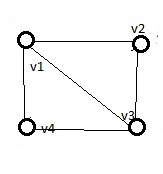 |
| Graph G to be colored |
 |
| Tree for 3-coloring of graph G |
--------------------------------------------------------------------------------------------------------------------------
Java Source Code
--------------------------------------------------------------------------------------------------------------------------
public class MWayGrColor{
    /*G is graph's adjacency matrix and x is solution vector */
    private int G[][],x[],n,m,soln;

    public void mColoring(int k){  //backtracking function
        for(int i=1;i<=n;i++){
           next_color(k);  //coloring kth vertex
           if(x[k]==0)
              return;  //if unsuccessful then backtrack
           if(k==n)  //if all colored then show
              write();
           else
              mColoring(k+1);  /* successful but still left to color */
        }
   }

   private void next_color(int k){
      do{
           int i=1;
         x[k]=(x[k]+1)%(m+1);
         if(x[k]==0)
           return;
         for(i=1;i<=n;i++)
            if(G[i][k]!=0 && x[k]==x[i])  /* checking adjacency and not same color */
               break;
         if(i==n+1)   return;  //new color found
      }while(true);
   }

   private void write(){
      System.out.print("\nColoring(V C) #  "+(++soln)+"-->");
      for(int i=1;i<=n;i++)
          System.out.print("\t("+i+" "+x[i]+")");  //solution vector
   }

   public void input(){
         java.util.Scanner sc=new java.util.Scanner(System.in);
         System.out.print("Enter no. of vertices : ");
         n=sc.nextInt();
         G=new int[n+1][n+1];
         x=new int[n+1];
         System.out.print("Enter no. of colors : ");
         m=sc.nextInt();
        System.out.println("Enter adjacency matrix-->");
        for(int i=1;i<=n;i++)
           for(int j=1;j<=n;j++)
               G[i][j]=sc.nextInt();
   }

   public static void main (String[] args) {
        MWayGrColor obj=new MWayGrColor();
        obj.input();
        obj.mColoring(1);
        if(obj.soln==0)
           System.out.println("\nNeed more than "+obj.m+" colors");
        else
           System.out.print("\nTOTAL SOLN : "+obj.soln);
   }
}
--------------------------------------------------------------------------------------------------------------------------
Output
--------------------------------------------------------------------------------------------------------------------------
Enter no. of vertices : 4
Enter no. of colors : 3
Enter adjacency matrix-->
0 1 1 1
1 0 1 0
1 1 0 1
1 0 1 0
Coloring(V C) # 1--> (1 1) (2 2) (3 3) (4 2)
Coloring(V C) # 2--> (1 1) (2 3) (3 2) (4 3)
Coloring(V C) # 3--> (1 2) (2 1) (3 3) (4 1)
Coloring(V C) # 4--> (1 2) (2 3) (3 1) (4 3)
Coloring(V C) # 5--> (1 3) (2 1) (3 2) (4 1)
Coloring(V C) # 6--> (1 3) (2 2) (3 1) (4 2)
TOTAL SOLN : 6
--------------------------------------------------------------------------------------------------------------------------
Enter no. of colors : 3
Enter adjacency matrix-->
0 1 1 1
1 0 1 0
1 1 0 1
1 0 1 0
Coloring(V C) # 1--> (1 1) (2 2) (3 3) (4 2)
Coloring(V C) # 2--> (1 1) (2 3) (3 2) (4 3)
Coloring(V C) # 3--> (1 2) (2 1) (3 3) (4 1)
Coloring(V C) # 4--> (1 2) (2 3) (3 1) (4 3)
Coloring(V C) # 5--> (1 3) (2 1) (3 2) (4 1)
Coloring(V C) # 6--> (1 3) (2 2) (3 1) (4 2)
TOTAL SOLN : 6
--------------------------------------------------------------------------------------------------------------------------
Download Links
--------------------------------------------------------------------------------------------------------------------------
DOWNLOAD the source from Mediafire
DOWNLOAD the source from Dropbox
DOWNLOAD the source from 4shared
DOWNLOAD the source from Dropbox
DOWNLOAD the source from 4shared
--------------------------------------------------------------------------------------------------------------------------
Related Posts
--------------------------------------------------------------------------------------------------------------------------
To color a graph with least number of colors visit
Sunday, November 25, 2012
Everyone of you know that files are being uploaded to the server and you can easily download them. You must have thought of how these files are being uploaded to server. Today I am going to post how you can very easily create your own file upload server; Previously before Servlet3.0 technology you might have seen that it was a bit difficult process and you had to use third-party library like Apache-commons. But now it has become very easy.
--------------------------------------------------------------------------------------------------------------------------- The first thing you will have to do is to create the upload-form using HTML. In the form you will have to mention the enctype="multipart/form-data" .
- In servlet there is an annotation called MultipartConfig . It has different params like location, maxFileSize and so on. The location should be a valid folder path on server where the file will be uploaded. Now write the part and also do string processing to get the name of the file ro use the same name while uploading it.
- Now display the details of the file uploaded by request forwarding to a JSP.
HTML form and code
--------------------------------------------------------------------------------------------------------------------------
Select a file to upload
<html>
<body>
<h3>File Upload Form</h3>
Select a file to upload
<form action="./upload.html" method="post"
enctype="multipart/form-data">
<input type="file" name="file" size="50" />
<br/>
<input type="submit" value="Upload File" />
</form>
</body>
</html>
--------------------------------------------------------------------------------------------------------------------------
--------------------------------------------------------------------------------------------------------------------------
<body>
<h3>File Upload Form</h3>
Select a file to upload
<form action="./upload.html" method="post"
enctype="multipart/form-data">
<input type="file" name="file" size="50" />
<br/>
<input type="submit" value="Upload File" />
</form>
</body>
</html>
--------------------------------------------------------------------------------------------------------------------------
Servlet and JSP Code
--------------------------------------------------------------------------------------------------------------------------
/* Servlet Code */
import java.io.IOException;
import java.util.Collection;
import javax.servlet.RequestDispatcher;
import javax.servlet.ServletException;
import javax.servlet.annotation.MultipartConfig;
import javax.servlet.annotation.WebServlet;
import javax.servlet.http.HttpServlet;
import javax.servlet.http.HttpServletRequest;
import javax.servlet.http.HttpServletResponse;
import javax.servlet.http.Part;
@WebServlet("/upload.html")
@MultipartConfig(location="D:/ Documents",fileSizeThreshold=1024*1024,
maxFileSize=50*1024*1024,maxRequestSize=5*1024*1024*1024)
public final class Uploader extends HttpServlet {
private static final long serialVersionUID = 1L;
protected void doPost(HttpServletRequest request, HttpServletResponse response) throws ServletException, IOException {
Collection<Part> parts=request.getParts();
StringBuffer sb=new StringBuffer();
sb.append("<h2>Total "+parts.size()+" parts uploaded</h2>");
for(Part p: parts){
getDetails(sb, p);
p.write(getFileName(p)); //writing file to server
}
request.setAttribute("partDetails",sb);
RequestDispatcher view=request.getRequestDispatcher("result.jsp");
view.forward(request, response); //forwarding to JSP
}
private String getFileName(Part p){
String header=p.getHeader("content-disposition");
String filename = header.substring(header.indexOf("filename=\"")).split("\"")[1]; //getting filename
return filename;
}
private void getDetails(StringBuffer sb,Part p){
sb.append("<p></p>");
for(String header:p.getHeaderNames()){
sb.append("<b>"+header+" : </b>");
sb.append(p.getHeader(header)+"</br>");
}
}
}
import java.util.Collection;
import javax.servlet.RequestDispatcher;
import javax.servlet.ServletException;
import javax.servlet.annotation.MultipartConfig;
import javax.servlet.annotation.WebServlet;
import javax.servlet.http.HttpServlet;
import javax.servlet.http.HttpServletRequest;
import javax.servlet.http.HttpServletResponse;
import javax.servlet.http.Part;
@WebServlet("/upload.html")
@MultipartConfig(location="D:/ Documents",fileSizeThreshold=1024*1024,
maxFileSize=50*1024*1024,maxRequestSize=5*1024*1024*1024)
public final class Uploader extends HttpServlet {
private static final long serialVersionUID = 1L;
protected void doPost(HttpServletRequest request, HttpServletResponse response) throws ServletException, IOException {
Collection<Part> parts=request.getParts();
StringBuffer sb=new StringBuffer();
sb.append("<h2>Total "+parts.size()+" parts uploaded</h2>");
for(Part p: parts){
getDetails(sb, p);
p.write(getFileName(p)); //writing file to server
}
request.setAttribute("partDetails",sb);
RequestDispatcher view=request.getRequestDispatcher("result.jsp");
view.forward(request, response); //forwarding to JSP
}
private String getFileName(Part p){
String header=p.getHeader("content-disposition");
String filename = header.substring(header.indexOf("filename=\"")).split("\"")[1]; //getting filename
return filename;
}
private void getDetails(StringBuffer sb,Part p){
sb.append("<p></p>");
for(String header:p.getHeaderNames()){
sb.append("<b>"+header+" : </b>");
sb.append(p.getHeader(header)+"</br>");
}
}
}
/* JSP Code */
<html>
<head><title>Upload Details</title></head>
<% StringBuffer result=(StringBuffer)request.getAttribute("partDetails");
%>
<body>
<%= result %>
</body>
</html>
<head><title>Upload Details</title></head>
<% StringBuffer result=(StringBuffer)request.getAttribute("partDetails");
 |
| Output as seen in Chrome |
<body>
<%= result %>
</body>
</html>
--------------------------------------------------------------------------------------------------------------------------
DOWNLOAD LINKS
--------------------------------------------------------------------------------------------------------------------------
Subscribe to:
Posts
(Atom)
Popular Posts
-
 Today I will show you how you can implement Bankers algorithm in Java. The Banker's algorithm is a resource allocation and deadlock a...
-
------------------------- UPDATE ------------------------- I have updated the code on request of some followers so that they can directly...
-
 Today I am going to show how to convert a postfix expression to an infix expression using stack in Java. In an earlier post here we ...
-
 Today in this article I will tell you how to convert an infix expression to postfix expression using stack. This is an important applicat...
-
 --------------------UPDATE------------------- I have updated my post so that now it can detect IE 11. This modification was necessary as t...
-
 Today I am going to show you how you can generate and validate captcha. A CAPTCHA (an acronym for "Completely Automated Public Turin...
-
 Today I am going to post a program that will be able to produce all the mColorings of a given graph G. What is mColoring : The problem st...
-
 Today in this article I will show you how to create or develop a Tower of Hanoi game in Java. The Tower of Hanoi is a famous problem tha...
